Entity relationship diagrams
Make sense of
the data you share.
What does your business keep track of? An entity relationship diagram puts those things, their details, and their connections in one shared picture.
When is this useful?
Use an ERD to agree on the information an application needs, understand an existing business system, or discuss a database design with your team. Start with familiar parent records and the child records that belong to them, such as a company and its contacts or invoices.
Read the example
Companies, contacts, invoices, and the items on them.
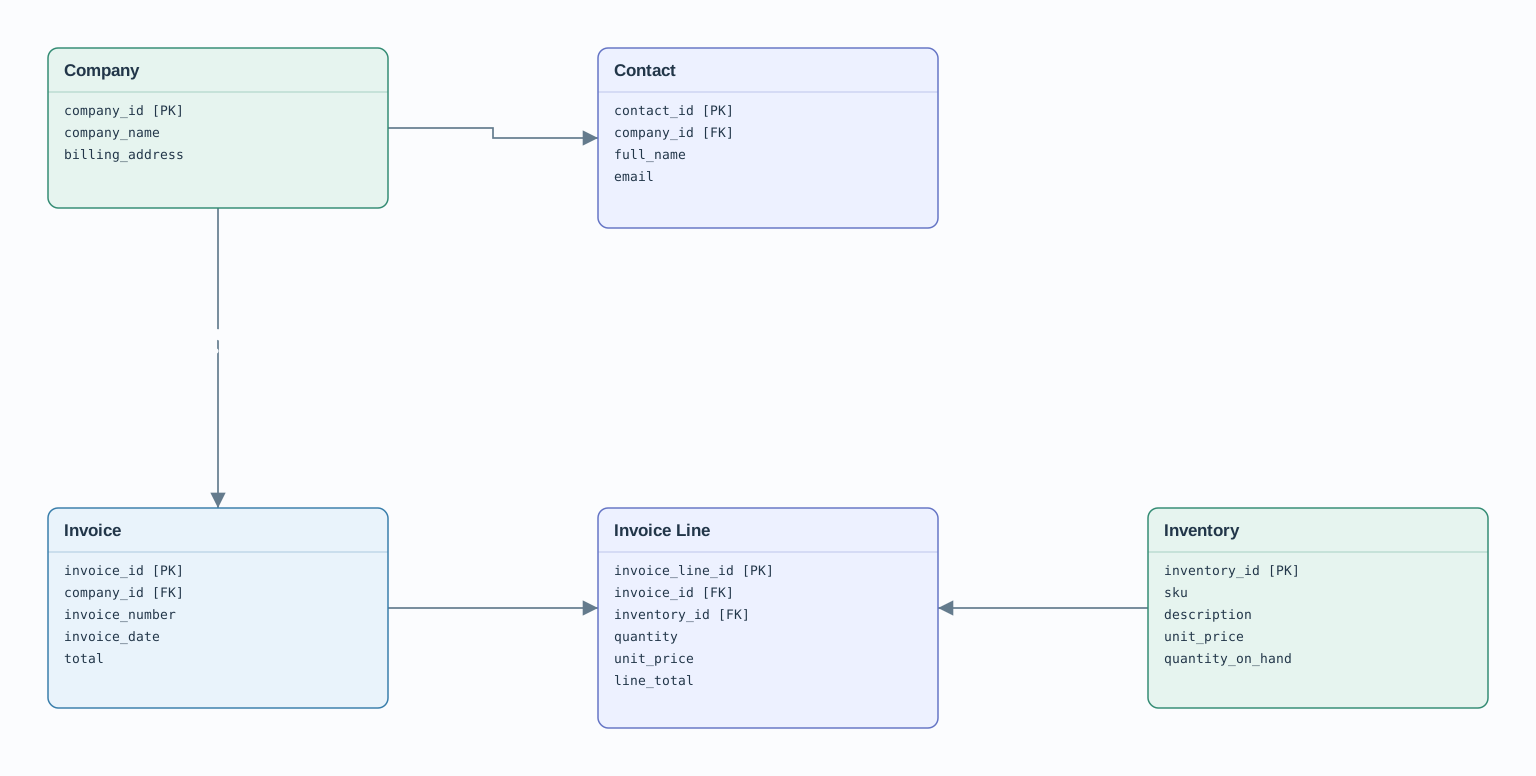
- 1Entities: the boxes
- Company, Contact, Invoice, and Inventory name record types. Invoice Line records each item sold on an invoice.
- 2Attributes: the rows
- [PK] marks a primary key, such as company_id. [FK] marks a reference to a parent record: a Contact’s company_id points to Company.
- 3Relationships: the connections
- 1 → 0..* means one Company may have zero or many Contacts or Invoices. 1 → 1..* means an Invoice contains one or more Invoice Lines. Each child belongs to one parent on that relationship.
Why have an Invoice Line?
An invoice can contain several inventory items, and the same item can be sold on many invoices. Invoice Line connects the two and stores the quantity, unit price, and line total for that particular sale.
Make one small change
Start with something you recognise.
Open the example, select Company or Contact, and change its name or field rows. Apply your changes, then connect another box. You can undo, save the editable source, or download a PDF.